
diados
Extension of the Day

diados

5.0 FREE
  • Screenshot 1

Description

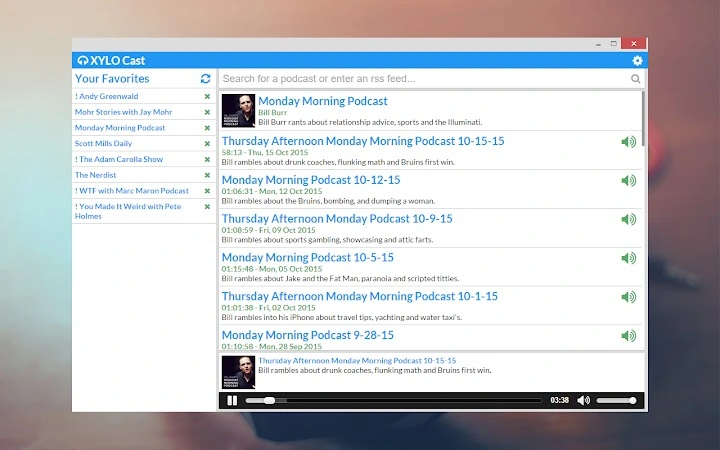
Chrome podcast manager - Stream podcasts and save your favorites on Windows, OSX, Linux and ChromeOS. Syncs across devices.Changelog:1.1.1b - 12th February 2016* Fixed an issue where icons sometimes display as 'undefined'.1.1.1a* Added the option to auto-expand episode details on main podcasts page* Added the option to replace icons with text (useful for screen readers)* On startup the main screen now shows your last viewed podcast* Updated the settings page layout* Fixed an issue where invalid feed data would prevent all episodes from appearing* Fixed an issue where favorite updates never completed1.1* Added ability to update all podcasts at once* Added auto update on launch option in settings1.0.1* Added switch for Chrome or default OS window style (in settings page)1.0* First full release* New: First run message/instructions* Updated: Cleaner UI0.0.3* New: Added ability to specify rss feed instead of searching* New: Added reset window size option (settings)* Fixed: Added scrolling to settings pane0.0.2* New: Player remembers audio position on pause and syncs across devices* New: Changelog* New: Message on update advising of changes* Fixed: Fixed issue where some podcasts didn't display artwork* Fixed: Podcasts with no listed duration no longer display 'undefined'* Fixed: Added error message for searches with no results0.0.1* Initial Release

Guides & Tutorials for XYLO Cast App for Chrome

How to install XYLO Cast App for Chrome
  1. Click the Preview / Download button above.
  2. Once redirected, accept the terms and click Install.
  3. Wait for the XYLO Cast App for Chrome download to finish on your device.
How to use XYLO Cast App for Chrome

This software is primarily used for its core features described above. Open the app after installation to explore its capabilities.

User Reviews for XYLO Cast App for Chrome 0

    No reviews found

Similar Apps


